Guide · checked 1 October 2026
Apps that help Christians put the phone down
You pick up your phone to check one thing, and twenty minutes later you're still scrolling. A new kind of app tries to turn that moment into a moment with God: it puts a verse, a prayer or a Bible reading between you and Instagram. We make one of them, Mutter, so take this with that in mind. Below are the eight we think worth knowing about: how each one unlocks, what it costs, what it does with your data, and what nearly two thousand reviewers say about living with it. At the end are the habits that help whichever app you choose, or none.
We make Mutter, so we're biased. Mutter is a free iPhone prayer app made by an independent maker. We've put it in this guide where it fits, said where it falls short, and not put it first. Everything about other apps was checked on 1 October 2026 and is linked to its source.
How these apps work
On iPhone, all of them use Apple's Screen Time. You choose the apps (and sometimes websites) to guard. When you open one, a screen appears in front of it instead. You do whatever the app asks, and it lets the app open, usually for a while. Apple keeps your choice of apps private: the app sees a sealed token for each one, not its name or how long you use it.
The big difference is what you have to do. Some ask you to read the Bible for a set time. Some ask you to pray, once a day or each time. One asks you to scan a page of a paper Bible. One pays you in minutes for every verse. That matters more than the features, because it's what you'll be doing many times a day.
The eight, side by side
| App | How you unlock | Free without paying | Price | Android | App Privacy label | Rating |
|---|---|---|---|---|---|---|
| Mutter we make this | Today's verse or prayer comes first. Say Amen and the app opens for the time you set. | Everything. | Free. No ads, purchases, subscriptions or donations. | No. iPhone only. | Data linked to you: name, email, your prayers and an account ID, only to run the app. No tracking. | None yet |
| Bible Mode | Scan a page of your paper Bible with the camera, or do a short verse reflection, prayer and affirmation. Reviewers also mention quizzes, a timed quiet time and an emergency unlock. | A usable free tier; reviewers like that most of it isn't paywalled. Limits on some features. | Optional ‘Bible Time Supporter’ purchases, £4.99 to £59.99. App Store | No (its site says iPhone and iPad only). | Tracking: identifiers. Nothing linked to you. | 4.9 from 12,402 (US) |
| BibleScroll | Blocks your chosen apps every day until you've read the Bible for the time you set (reviewers mention 5 to 30 minutes). Connects to the YouVersion Bible app. | A 7-day trial, then a subscription is required. | £9.99 a week or £59.99 a year, plus ‘donation’ tiers. App Store | A Google Play listing exists, with almost no reviews yet. | ‘Data Not Collected’. | 4.8 from 5,567 (US) |
| Pray Screen Time | Pray before your chosen apps unlock. Its listing puts the app lock under ‘Paid Features’. | Reviewers describe a free tier with ads since mid-2025. | ‘Pray Screen Pro’, £7.99 to £49.99. App Store | Yes: on Google Play, 4.7 from 2,570 reviews. | Tracking: identifiers. Nothing linked to you. | 4.9 from 9,668 (US) |
| Sanctify | ‘Faith Lock’ pauses apps until you've spent a moment in prayer and Scripture, towards a daily goal you set. | Its listing says most features need a subscription; the Lock Screen verse widget is free. | $5.99 a week or $49.99 a year (US App Store). App Store | No. | Tracking: identifiers. Linked to you: purchases, contact info, identifiers, diagnostics. | 4.8 from 3,387 (US) |
| FaithLocked | At the prayer times you set, opening a chosen app takes you to a prayer pause (a verse, a short devotional, a moment to pray). Then the apps open for a window you choose. | Two prayers a day, with locks at your first two prayer times. | Premium £5.99 a week or £16.99 to £37.49 a year. It also sells streak freezes and ‘Faith Coins’. App Store | Yes, listed on Google Play as ‘Bible Widget & Daily Prayer’. | No tracking. Not linked: purchases, identifiers, usage data. | 4.8 from 884 (US) |
| Bible Break | Earn screen time by reading: one minute for every verse you read. | Bible reading, notes and progress are free; the screen blocker needs a subscription. | £5 a month, or £29.99 to £39.99 a year. App Store | No. | Tracking: usage data. Nothing linked to you. | 4.8 from 1,188 (US) |
| PrayLock | Once a day, pray for yourself or for people on your list to unlock your apps. | The daily prayer to unlock; prayer notes, topics and stats need a purchase. | Pro $4.99 a week, or $9.99 to $39.99 a year (US App Store). App Store | No. | Tracking: usage data. Nothing linked to you. | 4.8 from 383 (US) |
From each app's App Store listing (UK prices unless marked US) and its own description, checked 1 October 2026. Swipe the table sideways on a phone.
What 1,800 reviewers say
We read 1,789 App Store reviews of fourteen of these apps, and 202 Google Play reviews. The thing people love most is simple: they scroll less, and they start the day with God. The thing they hate most is just as simple: paying, especially when the price appears only after a long setup, or a required subscription is called a ‘donation’. Almost nobody complains that the lock is too strict; the complaints are about locks that don't work.
What people love
What they complain about
Rough counts of reviews raising each theme, from 1,789 App Store reviews of 14 of these apps and 202 Google Play reviews of Pray Screen Time, read in September and October 2026. One review can raise several themes.
The apps, one by one
Bible Mode by Friday Labs LLC
How the unlock works: Scan a page of your paper Bible with the camera, or do a short verse reflection, prayer and affirmation. Reviewers also mention quizzes, a timed quiet time and an emergency unlock.
What it costs: Optional ‘Bible Time Supporter’ purchases, £4.99 to £59.99. A usable free tier; reviewers like that most of it isn't paywalled. Limits on some features. App Store
What people love: Reviewers say it gets them off TikTok and Instagram, keeps them consistent (streaks of over a year are mentioned with pride) and that the free tier is genuinely usable. Scanning a real Bible feels like proof.
What they complain about: Paid features and an invite-friends-or-pay feature; a lock that sometimes doesn't relock or won't unlock; games that let you skip the reading; and devotionals some find AI-written.
“It doesn’t lock everything behind a paywall, I’m finally free.”
“It’s just a 50/50 shot that it actually will.”
BibleScroll by Screen Detox Inc
How the unlock works: Blocks your chosen apps every day until you've read the Bible for the time you set (reviewers mention 5 to 30 minutes). Connects to the YouVersion Bible app.
What it costs: £9.99 a week or £59.99 a year, plus ‘donation’ tiers. A 7-day trial, then a subscription is required. App Store
What people love: Less doom-scrolling, and ‘the Word before the world’: reading first thing, before anything else. Plenty of people read on past the timer.
What they complain about: Paying: a required subscription called a ‘donation’, the weekly price and cancelling. Few translations (people ask for the NIV, ESV and NKJV). One reset time a day, which doesn't suit shift workers, and a setup screen that sometimes hangs.
“My IG scroll time is way down and my time in the word is up.”
“It’s not a donation if it’s required to use the app.”
Pray Screen Time by Manifest Automation, Inc
How the unlock works: Pray before your chosen apps unlock. Its listing puts the app lock under ‘Paid Features’.
What it costs: ‘Pray Screen Pro’, £7.99 to £49.99. Reviewers describe a free tier with ads since mid-2025. App Store Google Play
What people love: A prayer is handed to you, so you don't have to come up with one, and it stops TikTok first thing.
What they complain about: Price (‘pay to pray’), and ads before you can finish the prayer, sometimes for paying users too. The same prayer for weeks. The iPhone app hadn't been updated for a year when we checked (last update 19 September 2025).
“a minimum of two 30 second ads just to complete the prayer”
Sanctify by Sacred Studios LLC
How the unlock works: ‘Faith Lock’ pauses apps until you've spent a moment in prayer and Scripture, towards a daily goal you set.
What it costs: $5.99 a week or $49.99 a year (US App Store). Its listing says most features need a subscription; the Lock Screen verse widget is free. App Store
What people love: Feeling closer to God, and help with lust, anxiety and stress.
What they complain about: A subscription screen some couldn't get past, after a long personal questionnaire.
“the onboarding builds emotional investment before showing any real value”
FaithLocked by Victor Cristobal Gonzalez Martin
How the unlock works: At the prayer times you set, opening a chosen app takes you to a prayer pause (a verse, a short devotional, a moment to pray). Then the apps open for a window you choose.
What it costs: Premium £5.99 a week or £16.99 to £37.49 a year. It also sells streak freezes and ‘Faith Coins’. Two prayers a day, with locks at your first two prayer times. App Store Google Play
What people love: Few reviews in English yet; most are short and positive.
What they complain about: Every low review we read was about the paywall.
Bible Break by Code By Cutting, LLC
How the unlock works: Earn screen time by reading: one minute for every verse you read.
What it costs: £5 a month, or £29.99 to £39.99 a year. Bible reading, notes and progress are free; the screen blocker needs a subscription. App Store
What people love: People like the idea of earning minutes by reading.
What they complain about: Subscription-only blocking, a ‘minute bank’ that doesn't match what was read, and Maps or the browser blocked when they shouldn't be.
“every verse I read, I get a minute of screen time”
“the minutes don’t line up”
PrayLock by Ruvix Ltd
How the unlock works: Once a day, pray for yourself or for people on your list to unlock your apps.
What it costs: Pro $4.99 a week, or $9.99 to $39.99 a year (US App Store). The daily prayer to unlock; prayer notes, topics and stats need a purchase. App Store
What people love: Praying for named people every day.
What they complain about: Too few reviews to say much.
Mutter which we make
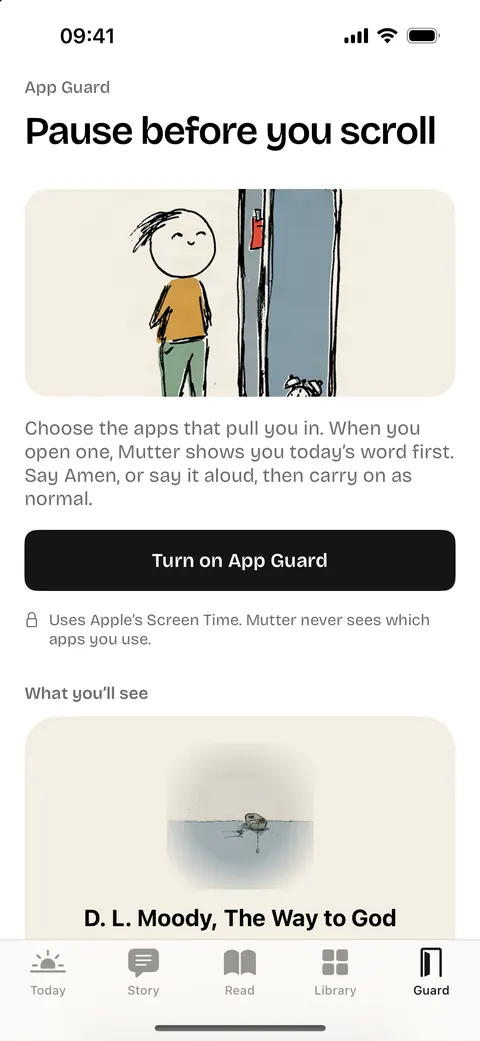
How the unlock works: you pick a verse or prayer for today, and the apps and websites that pull you in. When you open one, today's words come first. Say Amen and the app opens. You decide how long it stays open (15 minutes to 2 hours, or let Mutter vary it), when App Guard runs (up to six windows, on the days you choose), and whether you get some free minutes each day before it starts. There's a ‘skip for today’ if you need one, and it counts days you prayed rather than keeping a streak.
What it costs: nothing. No ads, purchases, subscriptions or donations, and every feature is free.
Where it falls short: it's iPhone only. It's a pause, not a lock: you can always get through, so if you want something firm that won't let you in until you've read, BibleScroll or Bible Mode will hold you to it better. You'll need an account. And it has no reviews, because nobody outside can use it yet.

Also worth knowing
The general pause apps. one sec, ScreenZen and Opal aren't Christian, but they're well made and very popular (4.8, 4.9 and 4.7 stars from 23,634, 50,715 and 88,900 US ratings). They add a breath or a delay before an app opens. You could pair one with a paper Bible on the bedside table.
What your phone already has. On iPhone, Settings, then Screen Time, gives you Downtime (most apps off at set hours) and App Limits, free. On many Android phones, Digital Wellbeing has app timers and a bedtime mode.
Ten things that help, with or without an app
- Charge it outside the bedroom. A cheap alarm clock does more than any app. The first and last scroll of the day are the hardest to resist.
- Put something on top of it. A Bible, a prayer book or a card with today's verse, on the phone, so you meet the words first.
- Decide what you'll do instead. ‘Less phone’ leaves a gap. Fill it on purpose: a psalm with your coffee, a name to pray for on the bus.
- Move the pull apps off the first screen. Or delete them and use the website, which is clunkier on purpose.
- Turn off every notification that isn't a person. Let people reach you; let apps wait.
- Try greyscale. On iPhone: Settings, Accessibility, Display & Text Size, Colour Filters, Greyscale. Colour is a lot of the pull.
- Use Downtime for the evening. Set it to start an hour before bed, with only calls and messages allowed.
- Keep one day lighter. A Sunday afternoon with the phone in a drawer is a small Sabbath, and you'll notice what you didn't miss.
- Tell someone. A friend who asks ‘how's the phone?’ beats a streak. Better still, pray for each other.
- Be kind to yourself. You'll slip. ‘He knows our frame; He is mindful that we are dust’ (Psalm 103:14). Pick it up, pray, and start again.
Questions people ask
Is there a free Bible app that locks your apps?
Mostly not completely: in nearly every app here the lock, or most of it, is paid. Bible Mode has a free tier reviewers find genuinely usable, and FaithLocked's free plan locks at two prayer times a day. Mutter is entirely free: the lock, the prayers and everything else.
Is there one for Android?
Pray Screen Time and FaithLocked are on Google Play. BibleScroll has a listing with almost no reviews. Most of the others, and Mutter, are iPhone only.
Can the app see what I do on my phone?
On iPhone, Screen Time hides which apps you chose from the app itself. What each app collects for its own use is in its App Store privacy label, summarised in the table above.
How we checked
On 1 October 2026 we read each app's App Store listing (description, price list, privacy label, ratings), Google Play where it exists, and its own site. The review counts and quotes come from our reading of public App Store reviews; every quote is short, dated and linked. We didn't install or sign up to the other apps. Spotted something wrong? Email hello@trymutter.com. None of these apps are connected to Mutter.
Sources
- Bible Mode on the UK App Store, checked 1 October 2026.
- BibleScroll on the UK App Store, checked 1 October 2026.
- Pray Screen Time on the UK App Store, checked 1 October 2026.
- Sanctify on the UK App Store, checked 1 October 2026.
- FaithLocked on the UK App Store, checked 1 October 2026.
- Bible Break on the UK App Store, checked 1 October 2026.
- PrayLock on the UK App Store, checked 1 October 2026.
- Pray Screen Time on Google Play, checked 1 October 2026.
- FaithLocked on Google Play, checked 1 October 2026.
- BibleScroll on Google Play, checked 1 October 2026.
- Sanctify on the US App Store (prices), checked 1 October 2026.
- PrayLock on the US App Store (prices, privacy label), checked 1 October 2026.
- biblemode.app, checked 1 October 2026.
- one sec on the App Store, checked 1 October 2026.
- ScreenZen on the App Store, checked 1 October 2026.
- Opal on the App Store, checked 1 October 2026.
Longer comparisons: Mutter vs Bible Mode and Mutter vs BibleScroll.